Wednesday, 14 August 2013

Install Nagios and monitor tools in Ubuntu (and other Linux distros) with setup file

Install Nagios is hard with newbie and install others tools make our must spend much time. But now, we can do it very easy with  OMD - The Open Monitoring Distribution

I will present how to install in ubuntu 13.04.


Note
  • Must change ubuntu to main repo (some other repo can make some dependence errors)

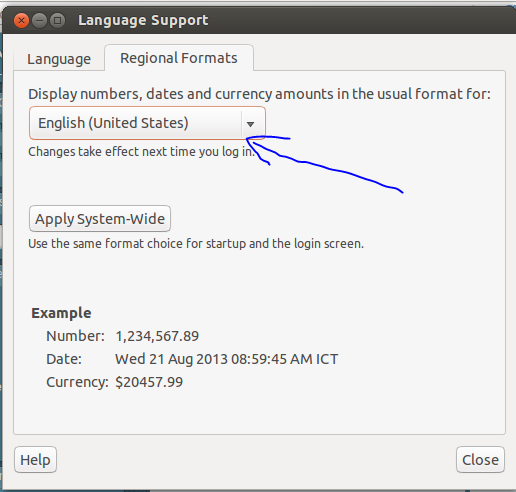
  • Must change
Iregion format tientuts blogspot

after change regional format, need logout or restart to apply.

Install and configure OMD

1. Download omd from http://omdistro.org/download or add repositories.
2. Go to terminal and update list packages:
sudo -s
apt-get update
3. Install omd file (or can install from repo with apt-get install ..)
dpkg -i <file_name>
4. Create first website:
omd create mysite
omd start

5. Go to website:
http://127.0.0.1/mysite
with username: omdadmin  and pass: omd
And go to omdistro.org , nagios and other tools website to read how to use them.

Note:
In ubuntu 13.04, having some error in check_mk user interface.I think install from source is better:
http://tientuts.blogspot.com/2013/08/install-nagios-in-ubuntu-1304-32bit.html

Tuesday, 13 August 2013

Install Nagios in ubuntu 13.04 32bit from source

Nagios core is an opensource system to monitor many things in network. Nagios offers monitoring and alerting services for servers, switches, applications, and services. It alerts the users when things go wrong and alerts them a second time when the problem has been resolved.
Because it free, opensource and easy to custom, many companies have applied it to monitor your system.
Today, I will present how to install nagios in ubuntu 13.04 32bit.

This article used information in Quickstart Installation Guides in nagios documents

Preconfigure
Must change regional format to English or will having errors in some plugin like check_mk:

regional format blogspot tientuts

Some package in my countries Ubuntu repo  don't support some packages like openssh-service. Please use main repo.
Change with command line, use: https://help.ubuntu.com/community/Locale

Setup
Go to superuser mode
sudo -s

Install dependencies
apt-get update
apt-get install build-essential apache2 php5-gd wget libgd2-xpm libgd2-xpm-dev libapache2-mod-php5 libssl-dev libapache2-mod-python -y

Create Account Information
/usr/sbin/useradd -m -s /bin/bash nagios
passwd nagios
/usr/sbin/groupadd nagcmd
/usr/sbin/usermod -a -G nagcmd nagios
/usr/sbin/usermod -a -G nagcmd www-data

Download and extract files

mkdir ~/downloads
cd ~/downloads
wget http://sourceforge.net/projects/nagios/files/nagios-3.x/nagios-3.5.0/nagios-3.5.0.tar.gz
wget http://sourceforge.net/projects/nagiosplug/files/nagiosplug/1.4.16/nagios-plugins-1.4.16.tar.gz
tar -xzvf nagios-3.5.0.tar.gz
tar -zxvf nagios-plugins-1.4.16.tar.gz

Compile and Install Nagios
cd nagios/
./configure --with-command-group=nagcmd --enable-event-broker
make all
make install
make install-init
make install-config
make install-commandmode

Configure the Web Interface
make install-webconf
htpasswd -c /usr/local/nagios/etc/htpasswd.users nagiosadmin
/etc/init.d/apache2 reload

Compile and Install Nagios plugin
cd ~/downloads
cd nagios-plugins-1.4.16/
./configure --with-nagios-user=nagios --with-nagios-group=nagios
make


Error and fix (Important)

when make with new linux distro like ubuntu 13.04 or centos 6.4 (don't appear in ubuntu 12.04), I met this error, view image:

go to gl folder of nagios-plugin , go to stdio.h file (must make to get this file), search gets.
And you will see the line like this:
_GL_WARN_ON_USE (gets, "gets is a security hole - use fgets instead");
change gets to fgets.

Continue compile and Install Nagios plugin
cd ~/downloads/nagios-plugins-1.4.16/
make
make install

Start Nagios and set startup

ln -s /etc/init.d/nagios /etc/rcS.d/S99nagios
/usr/local/nagios/bin/nagios -v /usr/local/nagios/etc/nagios.cfg
/etc/init.d/nagios start

Login to the Web Interface

http://localhost/nagios/
or http://127.0.0.1/nagios/

username: nagiosadmin

Install ssh server
sudo apt-get install openssh-server
to ssh from other pc

Install more plugins
apt-get install nagios-plugins*

folder of plugins:
/usr/local/nagios/libexec (from source)
/usr/lib/nagios/plugins (from apt-get)

Friday, 9 August 2013

Read microsoft office documents in Linux

Default of distros of linux are open source offices like libreoffice, koffice, abioffice ... but all of them reading doc, docx, xls, xlsx ... files are not very well. Today, I will present some solutions better.


Kingsoft Office


Home page: http://wps-community.org/ or http://www.kingsoftstore.com

It is the office productivity suite having free and pro versions, but with only free version, I can read ms office formats much better than libreoffice (what I am using). Besides, It is small, can download for offline install, run fast and user interface very like ms office, you can use without any difficulty.


Skydriver

Skydriver is an free store service of microsoft office with 7gb online. And it support read ms office formats perfectly. However, when you edit documents, it has many limit when compare with MS office offline in window.


OthersTo get full of power of ms office, you can do other solutions like:
  • Install MS office in window in virtual machine (vmware, virtualbox ..)
  • Install MS office via crossover (wine). Crossover is shareware but support install MS office in linux good and easy.


Tuesday, 6 August 2013

IDEs for javascript

automaticallyWith javascript, I think coding with debug, Aptana (in Eclipse) and Netbean are two of best free IDEs. It support many features, but like Python, IDE support autocomplete but not as good as java or C# (see here).
In my window, Aptana has some error, when I debug in Firefox, Aptana website alway show and IE always fore close, i can't debug so I like Netbean more than Aptana.

Note: If you want create and edit html code like word (WYSIWYW function), you need use Dreamwear, Microsoft Expression Web or free like Kompozer. Netbean only support write code.

Netbean


This is an image of Netbean with javascript debugger.

When you install Netbean support HTML5 (HTML5 = HTML + CSS3+ Javascript with new tags and features), you can create a HTML5 project, go to Run menu -> Set project configuration -> Chrome with netbean intergration, Netbean will connect with chrome browser via an plugin (be installed automatically).


So, I think Netbean is the best free IDE for javascript. You can try HTML5 and others in project.


Sunday, 4 August 2013

IDE for Python

I used some IDEs for Python. When compared with Netbeans for java or visual studio for c# I has been used, none of them have the same power, but I will present the best IDEs I know.

Netbeans (6.x version + python plugin)

Python with Netbeans 7.x don't support autocomple good, only Netbeans 6.x (I use 6.9) support good for autocomple.
To download old version, go do https://netbeans.org/downloads/6.9/ , to install plugin in, go to tools -> plugin -> availables options and search python.
I think Netbeans 6.x with python plugin is a good free IDE for python.
It support autocomplete the best (in IDEs i know), support format code (the same with eclipse).
Because python is dynamic type language, when autocomplete a variable, It will guess type,example:
a ="hello"
a.
It will show all suggestions for string type.
If a is the first time type, It will show suggestions for all types and an option specify type of  to set type to autocomple. Really good.

Debug in Netbeans good, can breakpoint, run 1 line .. but don't support show var in editor or watch frame, only having a debug frame, must write code and enter to watch value when debug.

When you install new package for python, delete folder and re open Netbeans, Netbeans will re-scan pagakes and update autocomplete.
C:\Users\<user_name>\.netbeans\6.9\var\cache\gsf-index

Must make project to run code but can add many folder in many area to run many code.


Eclipse + Pydev


Although it's not really good in suggestion and code format function is not comprehensive but I think it is one of the best in free IDEs for Python. Maybe Python has dynamic type, so it is difficult to autocomplete methods/functions and others IDEs I used has the same problem (or stupider, except Netbeans)
Like, with this code, I can't autocomplete strip() method.

def fun1(s):
    return s.strip()

print fun1("   Hello")
But from pydev 2.8.0, we can do it. View here to overcome. Or you can type "st" (at least 2 character) and ctrl+space
It support good with navigate, debug, crossplatform ...
Must make project to compile and run code.


Pycharm community


A free version of Pycharm IDE, but it is really good, better than Netbean, better than pydev but indicate variable type or autocomplete unknown variable can't be set.
I set it is the same with pydev. 


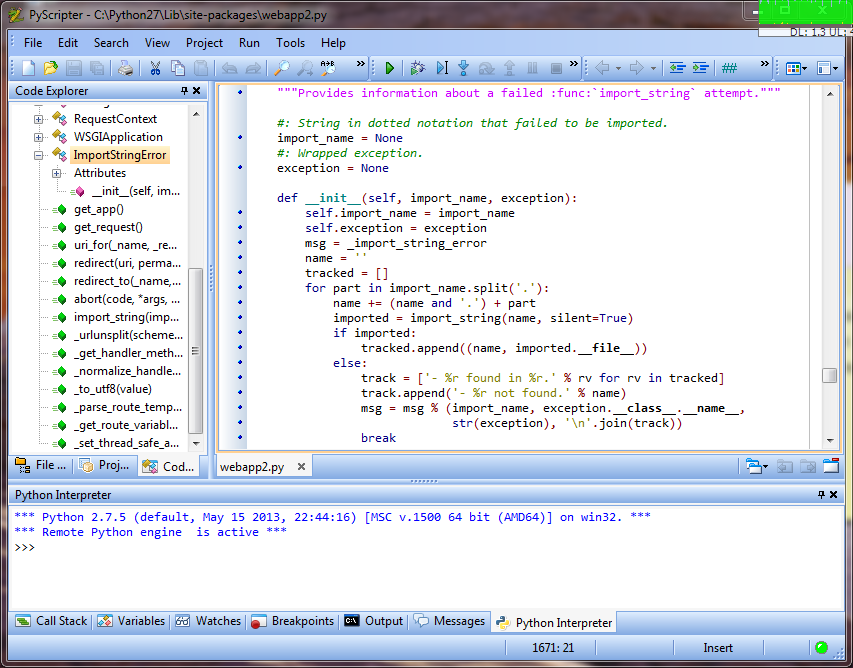
Pyscripter


Like Pydev but having some advantages:
  • More nice
  • Can run a single file
  • Lighter 
Disadvantages:
  • Only for window
  • Don't support autoformat code


Sublime text

Beside, some colleagues like sublime text.
It is nice, autocomplete good (same pydev but smoother), can run single file, support split window...
But can't debug, auto-format code, can use free but not full free.


If you like professional IDEs (sharewares0, you can try Pycharm, Komodo ... I tried one time for each but autocomplete not good like Netbeans.

Friday, 2 August 2013

IDE in programming

IDE is abbreviated to Integrated Development Environment or Interactive Development Environment.
Many programmers like coding with a basic editor and compile with command line and debug with print values, but I'm a programmer like the convenience and performance, I am always looking for good IDEs to get the code faster and more simple fixes. This is really good for big projects.

The criteria of me for finding IDEs are:
  • Format code
  • Autocomplete code
  • Support debug
  • Support view document of functions, methods
  • preferably free
  • And other criteria like nice interface, keyboard shortcut, cross-platform ...
And after articles with tag IDE, I will share good IDEs (or text editor support code) I used.

Thursday, 1 August 2013

Python with big number

Python is a good programming language for processing big number. We don't need to care about type of value or add any library.


Example:


result = 1
for i in range (1, 140):
    result *= i
print result


And this is result: 96157231969410890041971956135297253988256079629956908500367081914696145479218112119985149618783441690577636407442564169301886059792163365100096999581219760002673769583579570682891939608962934200435638009856000000000000000000000000000000000


With java, many friend of me don't know type of value larger than long. However, java support BigInteger and Bigdecimal.

    public class JavaApplication1 {
     
        /**
         * @param args the command line arguments
         */
        public static void main(String[] args) {
            question2();
        }
     
        public static void question2() {

            BigInteger fact = BigInteger.valueOf(1);
            for (int i = 1; i <= 139; i++) {
                //fact = fact.multiply(BigInteger.valueOf(i));
                fact.multiply(BigInteger.valueOf(i));
            }
            System.out.println(fact);
        }
    }

And with javascript, a language with dynamic type like python


var result =1;
for(var i=1;i<140;i++){
    result =result*i;
}
document.write(result);


Result: 9.615723196941086e+238
We must find and add libraries  in google to add.

So python is very comfortable in calculator with big number.